Template Looping in LWC: Render List Using for:each and iterator
When building applications in Lightning Web Components (LWC) one of the most common requirements is displaying a list of records – such as Accounts, Contacts, Products or Tasks.
In LWC, this is done using template looping.
In this blog, we’ll cover:
- What is template looping?
- How to render list using
for:each - How to use
iterator - Why
keyis mandatory - Real-world business example
What is Template looping in LWC?
Template looping allows you to iterate over a JavaScript array and dynamically render UI elements in your HTML template. It is commonly used to:
- Display records of SObjects
- Show dynamic table rows
- Render dropdown options
LWC provides two directives for:each and iterator to achieve template looping.
for:each loop in LWC
Syntax
<template for:each={list} for:item="item" for:index="index">
     <!--Your logic goes here-->
</template>
for:each: accept array as an input on which you want to iteratefor:item: This attribute represents the value of current item in list.for:index: This attribute holds the index of current item in list. It’s an optional attribute.
Example
<template>
    <lightning-card title="for:each loop">
        <div class="slds-p-around_medium">
            <ul class="slds-m-around_medium">
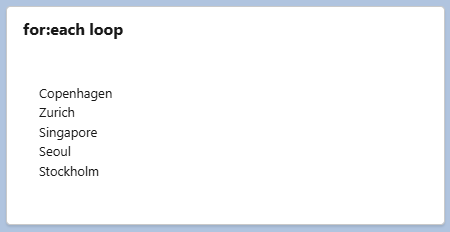
                <template for:each={capitalCities} for:item="item">
                    <li key={item.id}>{item.city}</li>
                </template>
            </ul>
        </div>
    </lightning-card>
</template>
import { LightningElement } from 'lwc';
export default class TemplateLoopingUsingforeach extends LightningElement {
    capitalCities = [
        {
            id: 38180,
            city: "Copenhagen"
        },
        {
            id: 47832,
            city: "Zurich"
        },
        {
            id: 69259,
            city: "Singapore"
        },
        {
            id: 17574,
            city: "Seoul"
        },
        {
            id: 57928,
            city: "Stockholm"
        }
    ];
}
-
for:each={capitalCities}:capitalCitiesis a list of objects on which we are iterating in HTML. -
for:item="item":itemis an alias which represents current item of list and we will use alias within directive.
for:each loopUsing iterator in LWC
iterator is used when you need to identify first and last element of list or apply any special behavior to first and last element of an array.
Syntax
<template iterator:itr={array}>
<!--Your logic goes here-->
</template>
iterator:itr={array} : itr is an iterator name or alias which we are going to use to access below properties. iterator name must be in lower case
-
itr.value: To access the value of actual record in array. If array is of objects, you can use it as follows{iteratorName}.value.{propertyName} -
itr.index: Position or index of array element. itr.first: Boolean value indicates whether element is the first element in list or not.itr.last: Boolean value indicates whether element is the last element in list or not.
Example
<template>
    <lightning-card title="iterator">
        <div class="slds-p-around_medium">
            <ul class="slds-m-around_medium">
                <template iterator:itr={capitalCities}>
                    <li key={itr.value.id}>
                        <template lwc:if={itr.first}> First City is: {itr.value.city}</template>
                        <template lwc:elseif={itr.last}> Last City is: {itr.value.city}</template>
                        <template lwc:else>{itr.value.city}</template>
                    </li>
                </template>
            </ul>
        </div>
    </lightning-card>
</template>
import { LightningElement } from 'lwc';
export default class TemplateLoopingUsingIterator extends LightningElement {
    capitalCities = [
        {
            id: 38180,
            city: "Copenhagen"
        },
        {
            id: 47832,
            city: "Zurich"
        },
        {
            id: 69259,
            city: "Singapore"
        },
        {
            id: 17574,
            city: "Seoul"
        },
        {
            id: 57928,
            city: "Stockholm"
        }
    ];
}
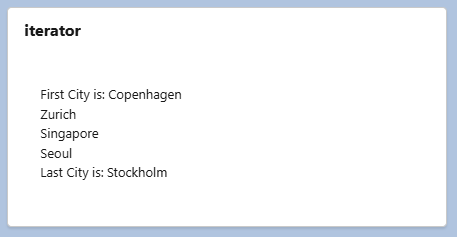
In the above example, we are rendering a list in HTML and conditionally rendering First City and Last City using itr.first and itr.last
iterator loopWhy key directive is must in template looping?
key is a must use directive for both for:each and iterator. It is used for performance optimization.
The key helps LWC framework to:
- Identify which items from list has changed
- Improve performance
- Avoid re-rendering entire DOM. Framework re-render only the element that changed
- Track list items efficiently.
key must be unique, it must be a string or number, it should not be an object. We can’t use index as a key value. If you are trying to render a list of SObject then you can preferably use recordId as a key.
Real World Business Examples
Template looping is a fundamental concept in LWC which is essential for implementing list view, data table, etc. It is widely used in LWC below are some of the real-world applications of template looping.
- Display list of SObject such as Opportunities, Cases or Leads, owned by logged in user on UI.
- Imagine building a Shopping cart to display list of products, remove products etc.
- Dynamic Rendering / Menu Rendering according to role.
- Display error list on UI while submitting the form.
Template looping is a fundamental concept every Salesforce developer should master. It helps in Clean UI development, performance optimization and writing scalable components.